OET on Paper, Computer or OET@Home: Which Should You Choose?
OET can be taken on paper, on computer at a venue or at home. Compare how each mode works, how fast you get results and which regulators and visa offices accept it before you book.
You can take OET in three ways: on paper at a test venue, on computer at a test venue, or at home on your own computer (OET@Home). All three test the same four skills, but they differ in how you answer, where you take Speaking, how late you can book, how fast results arrive and, most importantly, which regulators and visa offices accept them.
This guide explains each delivery mode in plain English, compares booking deadlines and results times, lists which major organisations accept which mode, and covers New Zealand's in-person rule from July 2026. It ends with a simple decision guide so you can choose the right mode before you pay for your test.
The three ways to take OET at a glance
OET is the same test of Listening, Reading, Writing and Speaking for healthcare professionals whichever mode you choose. Writing and Speaking are always for your own profession, so first make sure you know which of the 12 profession versions you need. The delivery mode only changes how the test is given to you.
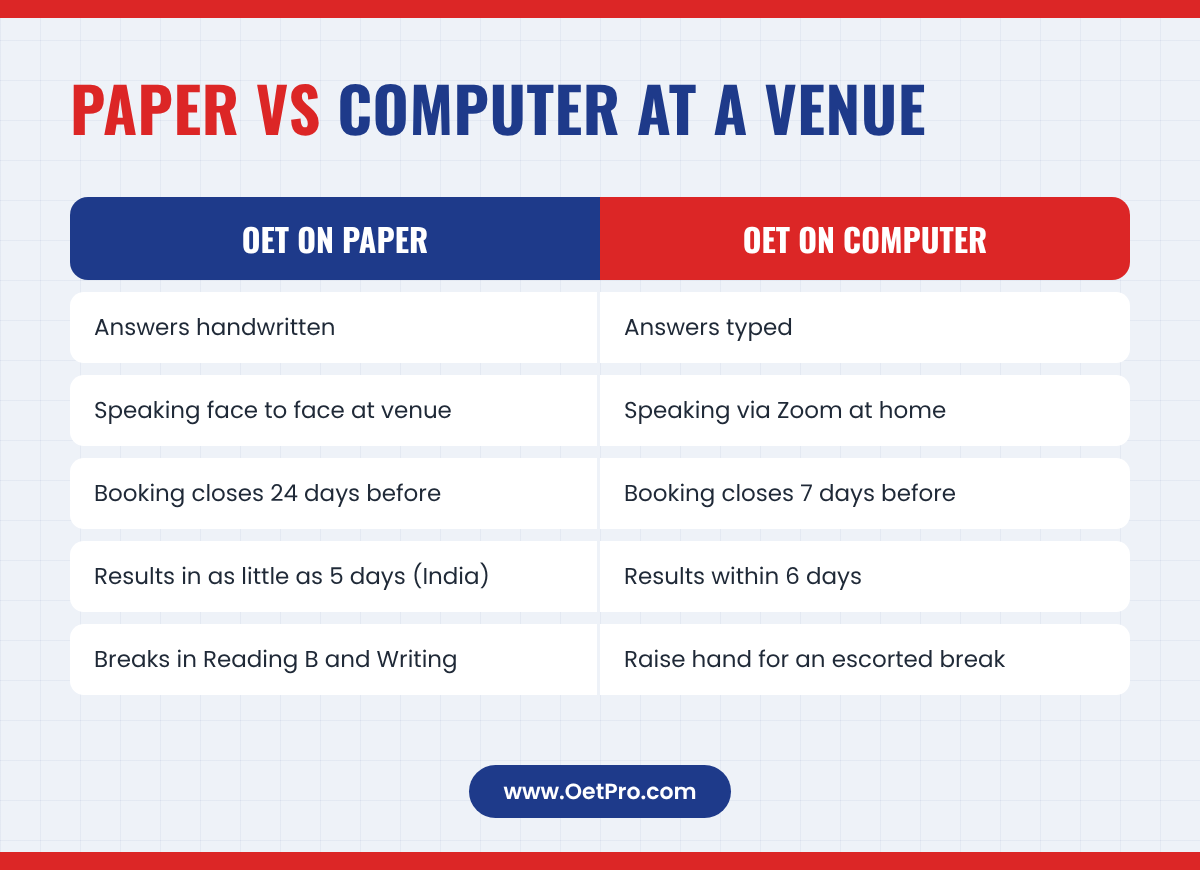
| Feature | OET on Paper | OET on Computer | OET@Home |
|---|---|---|---|
| Where you take Listening, Reading and Writing | Test venue | Test venue | Your own home |
| How you answer | Handwritten | Typed | Typed |
| Where you take Speaking | Face to face at the same venue | Online via Zoom, at home | Online via Zoom, at home |
| Booking closes | 24 days before the test | 7 days before the test | 7 days before the test |
| Results (indicative) | In as little as 5 days in India | Within 6 days of all 4 sub-tests | Within 6 days of all 4 sub-tests |
The sub-test times are the same in every mode: Listening takes about 40 minutes, Reading 60 minutes and Writing 45 minutes. The Speaking sub-test is two role-plays with an interlocutor who plays the patient or carer. If you want a full picture of the test parts, read our OET exam format guide.
OET on Paper at a test venue
This is the traditional way to take OET. You go to a test venue, sit at a desk with an invigilator in the room, and write your answers by hand in question booklets and answer sheets.
How it works
- The venue emails you a timetable. You follow that timetable on the day, and only you may attend.
- Your ID is checked against the photo you uploaded when you booked.
- You may bring only non-mechanical pens, pencils, an eraser, a sharpener and a small clear water bottle. Personal items go in the cloakroom.
- Staff open and seal tamper-evident bags for each sub-test, and you must stop writing when told.
- Bathroom breaks are allowed during Reading Part B and Writing, except in the first and last 10 minutes, with an invigilator going with you.
Speaking on paper test day
On the paper test, the Speaking sub-test is face to face, in the same venue as Listening, Reading and Writing. You are taken to the Speaking room, the interlocutor checks your ID, and the session begins. For many candidates this feels the most natural, because you sit in the same room as the person playing the patient.
Who it suits
- Candidates who write faster and more clearly by hand than they type.
- Candidates who prefer to do Speaking face to face rather than on a screen.
- Candidates whose regulator or visa office accepts only paper results (some Australian universities and TAFEs, for example, are listed by OET as accepting "OET Test on Paper only").
The main drawback is planning time: paper bookings close 24 days before the test, and OET says this deadline can change.
OET on Computer at a test venue
With OET on Computer you still go to a supervised test venue, but you take Listening, Reading and Writing on a computer and type your answers. OET says this mode uses the same security standards as the paper test.
How it works
- Arrive at least 30 minutes before the start of Listening, Reading and Writing.
- You upload an image of your ID when you book. On the day you show the original ID at check-in and your photo is taken.
- Personal belongings go in the cloakroom. Only tissues supplied by the centre are allowed at your desk.
- Typing stops when each section ends. You must not talk, look at other screens or leave without permission.
- To take a bathroom break, raise your hand and wait for a proctor to escort you. No extra time is given.
- Tests may be monitored by video and audio recording and through an observation window.
Speaking on computer: taken online from home
This is the part many candidates miss. For OET on Computer, the OET test regulations say the Speaking sub-test is conducted via Zoom at your home, in a private, quiet area, with your camera and microphone switched on. Zoom backgrounds are not allowed. Speaking must be taken in the same test administration window as the other three sub-tests, but not necessarily on the same day: usually within 5 days before or after your Listening, Reading and Writing test.
This matters because some organisations now insist that every part of OET is taken in person. See the New Zealand section below.
Who it suits
- Candidates who type quickly and are used to working on a computer, for example writing notes in an electronic patient record.
- Candidates who need a test soon: bookings close only 7 days before the test date (at 11:59 pm UTC).
- Candidates who need results quickly: OET says results come within 6 days of completing all four sub-tests.
OET@Home
OET@Home lets you take the whole test on your own laptop or desktop at home. Listening, Reading and Writing are delivered through Prometric's ProProctor application and watched by a live remote proctor. Speaking is a live online session with a human interlocutor.
What you need
The official OET@Home user guide (June 2025) lists these key requirements for Listening, Reading and Writing:
- A laptop or desktop PC. Tablets, company-issued devices and dual monitors are not allowed.
- A webcam (desktops need an external one) and wired headphones. Bluetooth is not allowed.
- Windows 8.1 or higher, or macOS 12.0 or higher (except 13.0 to 13.2.1), and Google Chrome.
- Internet of at least 5.0 Mbps download and 1.0 Mbps upload. A wired (Ethernet) connection is recommended.
- A fully enclosed, well-lit room with solid walls, where you are completely alone.
- A medium to large mirror (about 30 cm x 30 cm) for the room check, and a clear water bottle with no label.
Rules that are stricter at home
- You must provide proof of residency showing you are physically in the country where you are sitting the test.
- You log on at least 15 minutes before the start time and wait for ID checks. A readiness agent checks your room with a 360-degree camera view and checks your pockets, sleeves, ankles, ears and glasses.
- No pens, paper, notepads, phones or watches are allowed in the room. Phones must be kept outside the room.
- If anyone enters the room, the proctor ends the test and no results are issued.
- Your headphones must stay connected during Listening. If audio can be heard outside them, the test ends.
- You get one 10-minute scheduled break, only after Reading Part A. Failing to tell the proctor, or returning late, ends the test.
- If your internet drops, saved answers are kept, but the section timer does not stop. More than three disconnections, or one lasting 20 minutes or longer, ends the test.
Booking for OET@Home also closes 7 days before the test date, and results come within 6 days of completing all four sub-tests.
How the Speaking sub-test works in each mode
Speaking is where the modes differ most, so it is worth understanding clearly before you book.
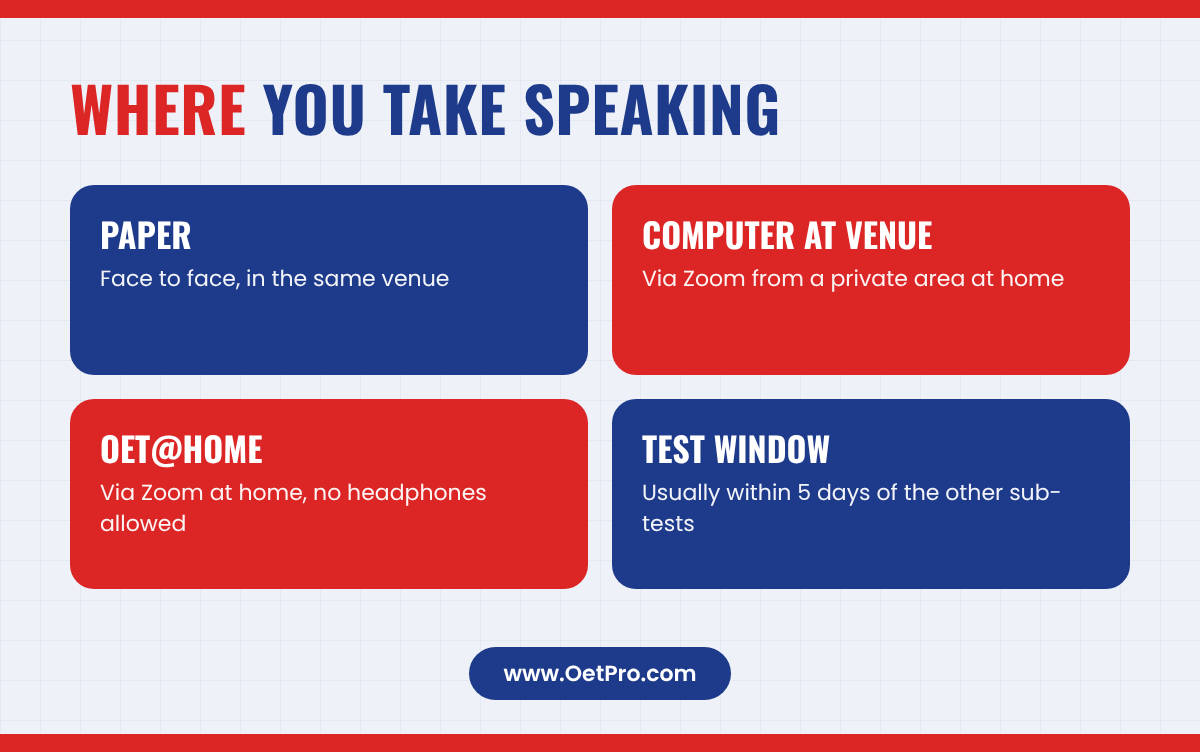
- Paper: face to face, in the same venue as the other sub-tests.
- Computer at a venue: online via Zoom from a private area at home, within the same test window (usually 5 days before or after the other sub-tests).
- OET@Home: online via Zoom from home. Headphones must not be worn for Speaking.
For online Speaking, OET's Speaking Platform user guide (June 2026) says you use the Prometric Secure Browser, which you should download at least one day before your test. It asks for a laptop or desktop (no tablets or company devices), at least 8 GB of RAM, a webcam of at least 480p, built-in or USB speakers and microphone, and an internet speed of at least 5 Mbps upload and download. Headsets and earphones of any type are not allowed. The interlocutor checks your ID and your room, asks a few warm-up questions that are not assessed, and then runs your two role-plays.
Whatever the mode, the role-plays and the way you are assessed stay the same. Our complete OET Speaking guide explains the role-play structure and the assessment criteria.
Booking deadlines and results times
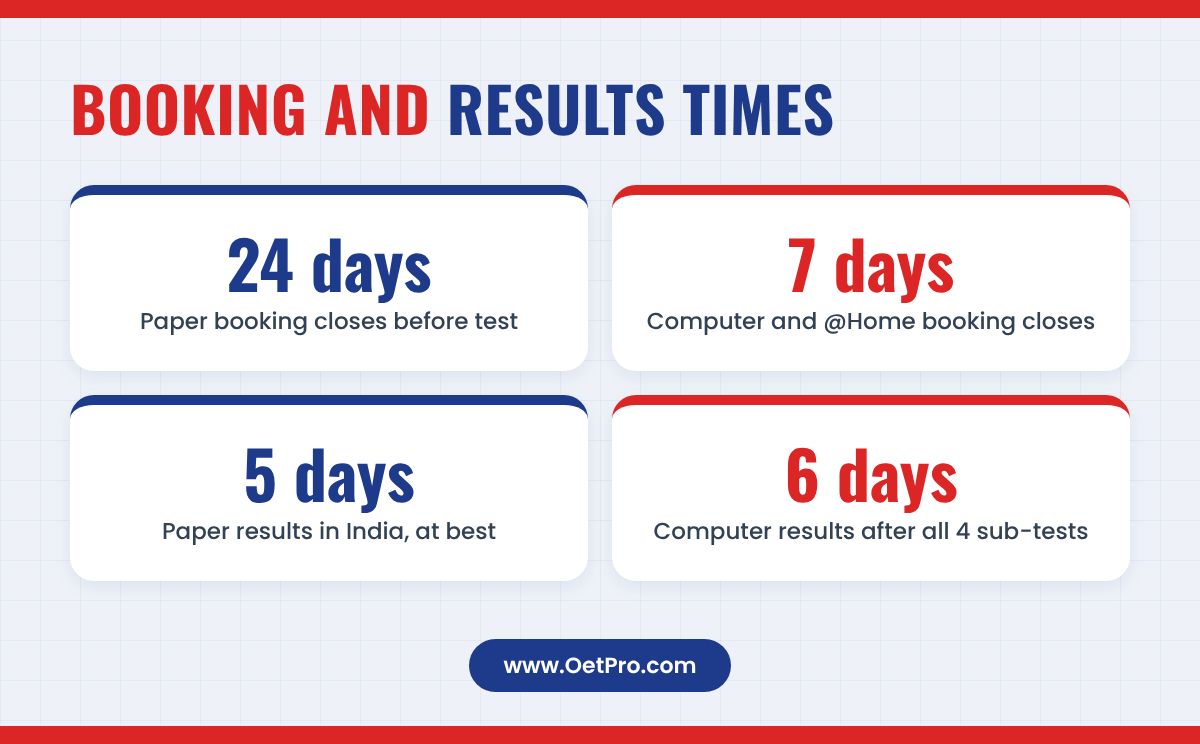
If you have a registration deadline or a job offer waiting, booking and results times may decide your mode for you. These are the figures on OET's booking page. OET describes all results dates as indicative, and booking deadlines can change.
| Mode | Booking closes | Results |
|---|---|---|
| OET on Paper | 24 days before the test | In as little as 5 days for candidates in India |
| OET on Computer (venue) | 7 days before, at 11:59 pm UTC | Within 6 days of completing all 4 sub-tests |
| OET@Home | 7 days before, at 11:59 pm UTC | Within 6 days of completing all 4 sub-tests |
Two practical points follow from this:
- If you need a test soon, only the computer modes can be booked as late as one week before the date.
- Results for computer modes count from your last sub-test. Because Speaking on computer can be on a different day, plan the whole test window, not only the Listening, Reading and Writing day.
Fees change and are set by OET, so always check the current price for your country and mode on the official booking page before you pay.
Which regulators accept which mode
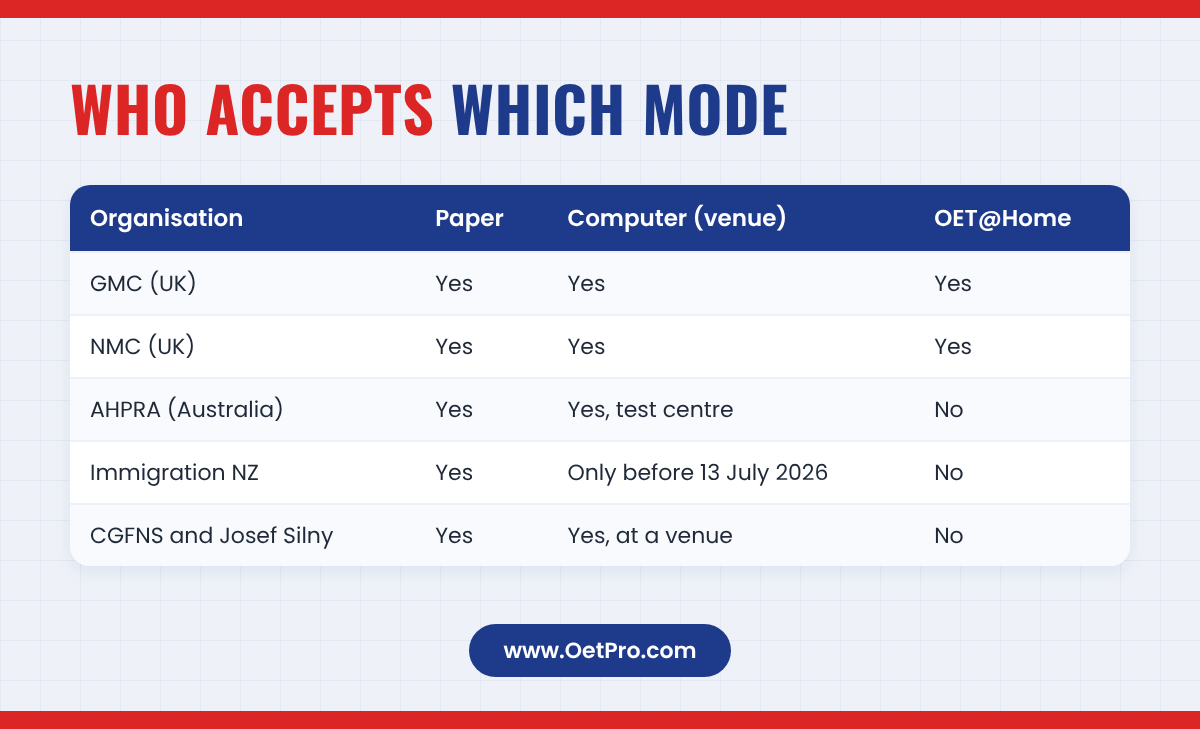
This is the most important question. A perfect score is useless if the organisation you are applying to does not accept the mode you used. Here is what the official pages we checked say. Always confirm with your own regulator before booking, because rules change.
| Organisation | Paper | Computer at venue | OET@Home |
|---|---|---|---|
| GMC (doctors, UK) | Yes | Yes | Yes |
| NMC (nurses and midwives, UK) | Yes | Yes | Yes |
| AHPRA and National Boards (Australia) | Yes | Yes, at a test centre only | No |
| Immigration New Zealand | Yes | Only if taken before 13 July 2026 | No |
| CGFNS and Josef Silny (USA) | Yes | Yes, at a venue | No |
UK: GMC and NMC
The GMC's OET page lists OET on paper, OET on computer and OET@Home as accepted, and says doctors must take the Medicine version. The NMC also says it accepts OET on Paper, OET on Computer and OET@Home, and that nurses should choose the Nursing version.
Australia: AHPRA
AHPRA's list of accepted English tests names "OET (on paper or computer based in testing centre)". It says at-home versions of English tests are not accepted. It also notes that the OET computer-based test "has one remote proctored element which has been assessed by National Boards as acceptable", which fits the online Speaking sub-test described above. AHPRA's minimum scores changed from 23 April 2026, so check its page for the scores that apply to your test date.
USA: CGFNS and Josef Silny
OET's own recognition list says that CGFNS and Josef Silny do not accept OET@Home results.
Other organisations
OET's recognition list shows that many organisations accept "OET Test on Paper and OET Test on Computer at a venue unless otherwise stipulated", and that some accept paper only. Search for your organisation on OET's Who recognises OET page, and read our guide to countries that accept OET.
New Zealand's in-person rule from July 2026
Immigration New Zealand (INZ) changed its rules in 2026. Its official update says that from midnight on 12 July 2026 (New Zealand Standard Time), you must take all parts of OET in person at a supervised test centre for an immigration application.
- If you take OET on or after 13 July 2026, you must go to a test centre for every part.
- If you completed the computer-based OET with a remotely given Speaking sub-test before 13 July 2026, you can still use those results.
- OET@Home is not an acceptable English test for Immigration New Zealand and, INZ says, has never been accepted.
INZ's operational manual also says that tests taken remotely outside a test centre, including at-home tests, are not acceptable. For visa purposes, INZ asks principal applicants who use OET for Grade C+ or higher in all four skills.
Because the standard OET on Computer has Speaking at home, candidates heading to New Zealand should choose OET on Paper, where Speaking is face to face at the venue, or ask OET whether a fully in-person option is available at their venue. Registration bodies such as the Nursing Council of New Zealand set their own rules, so check them as well.
Test-day rules that differ by mode
The skills tested are the same, but the day itself feels different. These are the differences most likely to catch you out:
Breaks
- Paper: bathroom breaks during Reading Part B and Writing, not in the first or last 10 minutes.
- Computer: raise your hand and wait for an escort; the clock keeps running.
- OET@Home: one 10-minute break only, after Reading Part A, followed by a full security check.
Notes and highlighting
On paper you can write on the question booklet. At home, pens, paper and notepads are not allowed; the OET@Home guide says highlighting is done in approved areas of the test on screen. Practise reading and planning on screen if you choose a computer mode.
ID
In all modes the ID you used to book must match the original ID you show on the day. A valid ID must include your full name, photograph and date of birth, and can be your passport or a government-issued ID. Bring the original; incorrect or different ID will not be accepted.
Technical problems
At a venue, staff deal with technical problems. At home, the problem is yours to manage: you use the Live Proctor chat, and if you must contact Prometric technical support, you may have to end your test. A stable connection and a quiet room are not optional extras.
How to choose: a simple decision guide
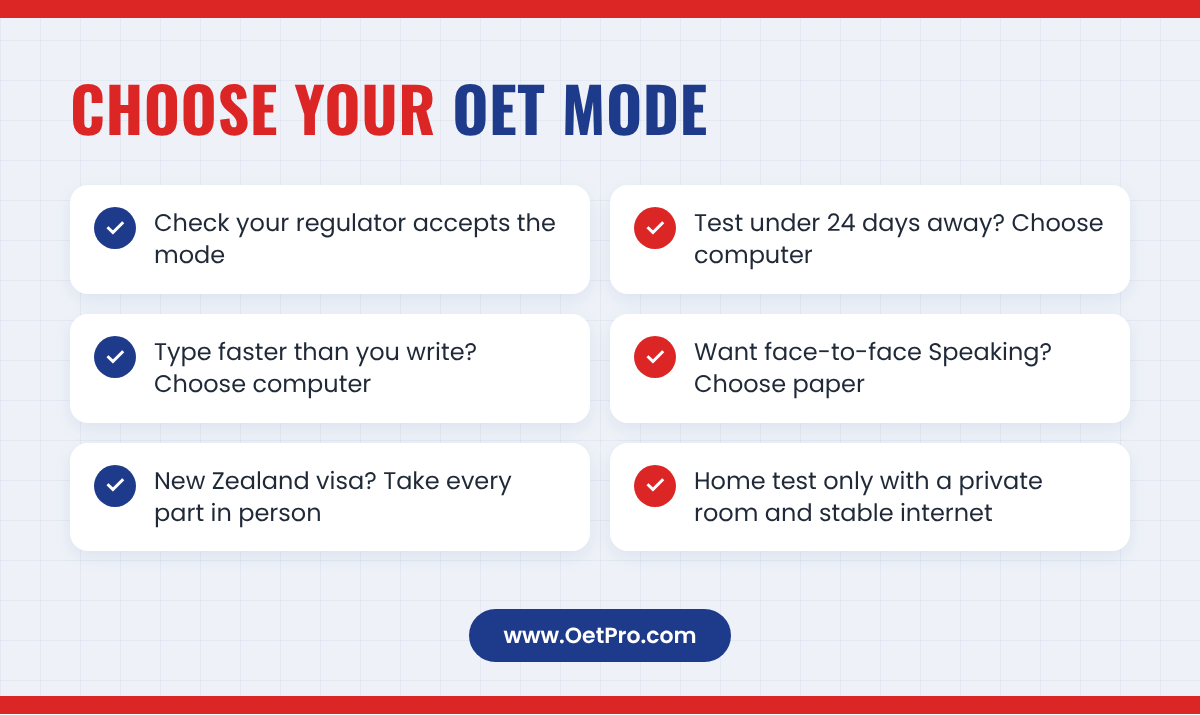
Work through these questions in order. The first one that applies to you usually decides your mode.
- Does your regulator or visa office accept the mode? If you are going to New Zealand, or to Australia through AHPRA, OET@Home is not accepted. For New Zealand immigration, every part must now be in person.
- How soon do you need the test? If your test is less than 24 days away, only the computer modes can still be booked.
- Do you type faster than you write? In 45 minutes of Writing, fast typing gives you time to plan and check. If your handwriting is quick and clear and your typing is slow, paper may suit you better.
- Do you prefer Speaking face to face? Only the paper test gives you a face-to-face Speaking session.
- Can you meet the home rules? Choose OET@Home only if your organisation accepts it and you have a private room, a suitable computer and a stable internet connection (OET recommends a wired one).
For most nurses and doctors in India applying to the UK, all three modes are accepted, so the choice comes down to timing, typing speed and comfort. For Australia, choose paper or computer at a venue. For New Zealand immigration, choose a fully in-person test.
Preparing for your chosen mode
The content of OET does not change between modes, so your main preparation is the same: build the reading, listening, writing and speaking skills that healthcare work demands. Our complete guide to OET and 4-week and 8-week study plans show you where to start.
What does change is the way you work during the test:
- For computer modes: practise typing your Writing letter in 45 minutes, reading long texts on screen and answering without paper notes.
- For paper: practise handwriting a full letter in the time, so your writing stays clear when you are tired.
- For online Speaking: practise role-plays on a video call with a friend, using your laptop's speakers and microphone rather than earphones.
- For every mode: take full timed practice tests so the 40, 60 and 45-minute sub-tests feel normal.
You can start today with an OETPRO free OET practice test on your computer, which is good practice for on-screen reading and answering. To save your results and track your progress, create a free account.
Common questions
Is OET@Home easier than the test-centre version?
No. When the NMC accepted OET@Home, it said the at-home test uses the same format and material as the test-centre version. The questions and assessment are the same; only the place and the security process change.
Is the OET Speaking test online for the computer-based test?
Yes. For OET on Computer, the official test regulations say Speaking is held via Zoom at your home, within the same test window as your other sub-tests. Only the paper test has face-to-face Speaking at the venue.
Which OET mode gives results fastest?
OET says computer and OET@Home results come within 6 days of completing all four sub-tests, and paper results for candidates in India can come in as little as 5 days. OET describes all results dates as indicative.
Can I use OET@Home for Australia or New Zealand?
No. AHPRA does not accept at-home tests, and Immigration New Zealand says OET@Home is not acceptable for its purposes. For New Zealand immigration, tests taken on or after 13 July 2026 must be taken fully in person at a test centre.
Can I take OET@Home from any country?
You must take OET@Home in the country you select when booking, and the test regulations say you must provide proof of residency to show you are physically present in that country. You also need a private room where you are alone for the whole test.
Sources
- OET: Book a test (booking deadlines and results times)
- OET: Test regulations
- OET@Home User Guide (June 2025)
- OET Speaking Platform User Guide (June 2026)
- OET: Who recognises OET
- OET: Pharmacy and Physiotherapy tests on computer and OET@Home
- GMC: Using your OET certificate
- NMC: Information for applicants affected by the OET issue
- NMC: NMC to accept OET on computer and OET@Home
- AHPRA: Accepted English language tests
- Immigration New Zealand: Update on English language testing
- Immigration New Zealand: Amendment Circular 2026-21
Practise with real OET-style tests
Free sample tests for all four sub-tests, with answers.